The Program tab defines the major service settings (such as application parameters, process settings, etc.).
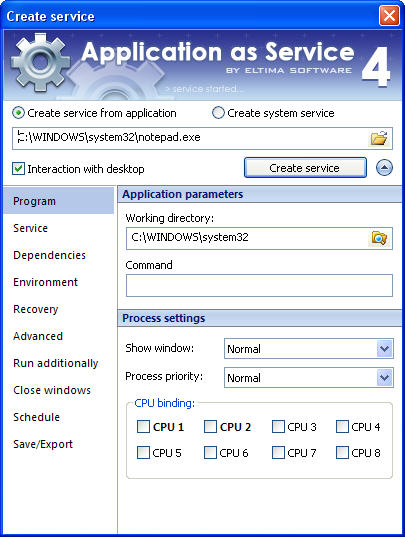
This tab is divided into two panes:
- “Application parameters” – allows setting the working directory and starting parameters;
- “Process settings” – allows selecting the display mode of the service and binding process for a definite CPU.
Application parameters
| Option | Purpose |
| Working Directory | This option defines the working directory of the application which is to be run as service. You can type the valid path on local disk or Universal/Uniform Naming Convention (UNC) path to the network drive (“//servername/full/path”), or select it with the help of “Open file” dialog. |
| Command |
This is an optional list of parameters that can be passed to the executable at the start time. It may contain username, system or service specific environment variables (for instance, %MYVAR%), file name and so on. |
Process settings
| Option | Purpose |
| Show window | This option defines the display mode of the service and is applicable to interactive services only. You can select the display mode from one of the available options: Normal, Hidden (silently disables the Interact with Desktop field), Minimized and Maximized. |
| Process priority | Specify the priority value of the process by selecting from the following options:
|
| CPU binding | Specify here the processor/processors that can be used by the service process. |