The Recovery tab contains the group of options that defines the system’s behavior on the service’s crash or fault. Not available for Windows NT4 users.
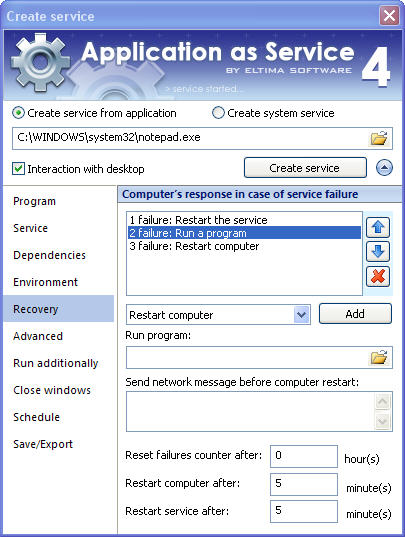
Here you can manage the list of actions that can be taken to recover the service. By clicking the corresponding buttons you can add new action, change actions order  and delete action
  .
.
Computer’s response in case of service failure:
| Option | Purpose |
| Take no action | There will be no computer’s response in case of service failure. |
| Restart the service | In case of service failure, your service will be automatically restarted. |
| Restart computer | In case of service failure, your computer will be restarted. |
| Run a program | In case of service failure, selected program will be launched. |
| Reset failures counter after | Specify time (in hours) after which failures counter will be reset. Specify 0 to indicate that this value should never be reset. |
| Restart computer after | Specify time (in minutes) after which computer will be restarted (this option is not available unless you select "Restart computer" action). |
| Restart service after | Specify time (in minutes) after which the service will be restarted (this option is not available unless you select "Restart the service" action). |
Besides, you can specify the broadcast message which will be sent to all logged users on the server reboot. This option is not available unless you select "Restart computer" option.