This tab allows launching additional applications prior to the service startup, program startup/stop or after the service shutdown. This feature is useful if your application requires that certain file (TCP port, etc.) should be opened before the application’s startup and closed after your application, launched as service, exits correctly.
Note that additional applications will be running for a limited time period since they are satelliting the service. If the applications specified here are running for unexpectedly long period of time, the Service Manager may consider the service not responding and force close it.
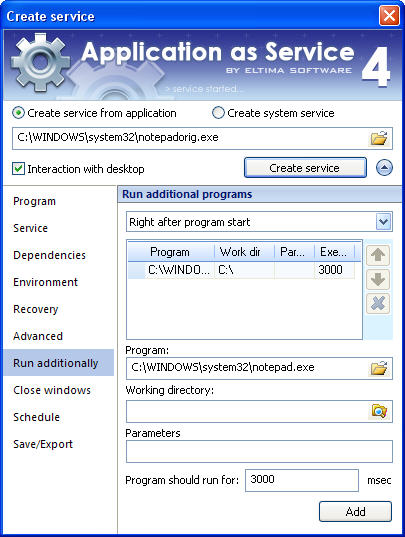
You can run additional programs:
- before service start – additional application is launched prior to the service (immediately after registration of the service in the system is executed);
- after service stop – additional application is started immediately after the command to stop the service is executed;
- before program start – additional application is started before the command to start the application (which is launched as service) is executed;
- right after program start – additional application is started immediately after the command to start the application (which is launched as service) is executed;
- before program stop – additional application is started every time before the command to stop the application (which is launched as service) is executed;
- right after program stop – additional application is started immediately after the command to stop the application (which is launched as service) is executed;
To specify the additional application to run, click  button, then select the working directory, additional parameters and execution period of time after which it will be force closed.
- Program
This is the full path and name (including the file extension) of the additional program to run.
- Work directory
Full valid path to the working directory of the application.
- Parameters
This is an optional list of parameters that can be passed to the executable. It may contain user, system or service-specific environment variables (e.g. %MYVAR%).
- Program should run for
Set the expected time to run the additional application. If the program exceeds this time limit, it will be force closed.
You can add additional applications as described above, sort them by clicking "Up" and "Down"  buttons, as well as remove them by clicking button
  .
.
If the particular service crashes, additional applications will not be launched.