During the communication process Terminal view panel can be blocked with lots of sent/received data, preventing from viewing new incoming info. Advanced Serial Port Terminal provides a simple way to resolve this problem – clear all messages from Terminal view panel.
To clear the communication log, do the following:
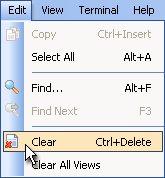
1. Switch to Terminal view and select "Edit" –> "Clear" option from main menu:
2. Alternatively, you can redirect all incoming data blocks into a text file.