You can export all incoming and outgoing data into a file for later analysis. To accomplish this task, please, follow the steps:
1. Switch to Data or Edit view by clicking the corresponding toolbar buttons.
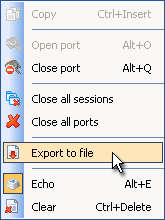
2. Right-click anywhere inside the view window to open the context menu. Select "Export to file" option:
3. In "Save As" dialog select the file name and the location where logs will be saved to.
4. Finally, click "Save" button to export the communication log into a file.