During communication with modem via established protocol, there might be a situation when you need to send a special character (like "\n" (Line feed), "\r" (Carriage return), etc.). You cannot type these special characters on keyboard, therefore to send them you should use hex symbol representation. Advanced Serial Port Terminal allows adding these characters to transmitted packets automatically whenever you need them.
Send “Line feed” and “Carriage return” characters, as follows:
1. Select "File" –> "Preferences" from main menu or press "Alt" + "P" to invoke "Preferences" dialog window:
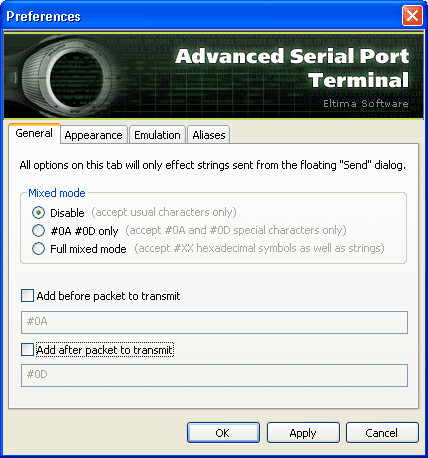
2. Enable "Add before packet to transmit" and "Add after packet to transmit" options and type any special character that should be sent before or after the packet in the corresponding text fields.
3. Click "Apply" button to save the changes.