After you have purchased Advanced COM Port Redirector registration code will be mailed to you straightaway. To register your copy of Advanced COM Port Redirector, please, select “Help” item from Main Menu and click “Enter registration code” option.
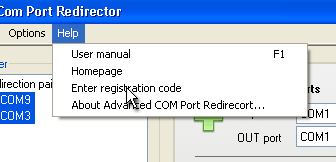
After you have purchased Advanced COM Port Redirector registration code will be mailed to you straightaway. To register your copy of Advanced COM Port Redirector, please, select “Help” item from Main Menu and click “Enter registration code” option.