For a guide on VSPD PRO version bundle panel, click here
In VSPD, there is a Bundle panel with a bulk of relevant information and several useful features. To get there, click on a port pair.
Here is what you can find in this panel:
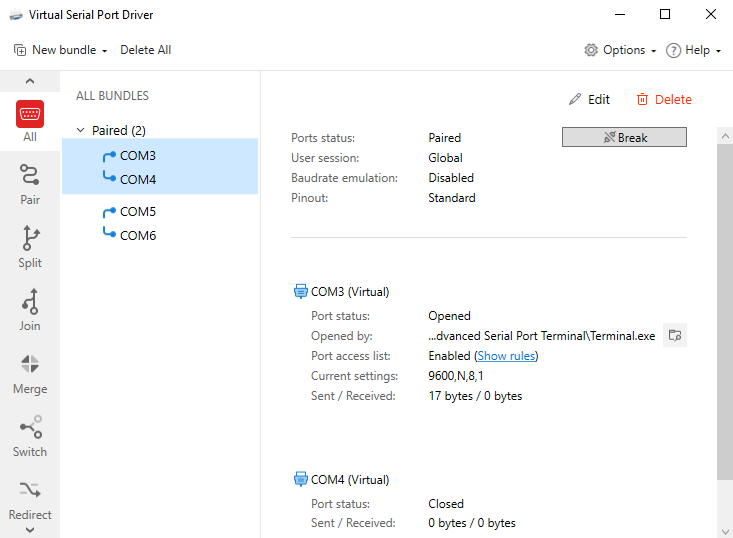
“Edit” is for quick access to the port pair settings.
“Delete” is for the selected port pair deletion.
The “Break” button is for the emulation of a physical line break. After you click this button, it gets replaced with the “Restore connection” one, and vice versa.
Ports status: shows if the ports are paired or unpaired.
User session: shows if this pair was created for the current user session only (by default, it’s not).
Baudrate emulation: shows whether the strict baudrate is enabled/disabled.
Pinout: displays which pinout preset is used.
Next, there will be information on each port in the bundle separately.
Virtual port (created by VSPD):
Virtual port, set as Main:
Port status: shows if the port is closed or opened by some application.
Opened by: here you’ll see the destination folder and application name which occupies this port, after you’ve opened it with that app (e.g. Windows HyperTerminal).
Port access list: you can see if any masks were applied (click “Show rules” to view the list).
Current settings: shows the port’s baudrate, parity, data bits, stop bits, and flow control.
Sent/Received – shows how many bytes were sent to/received from this port.