Scheduler permits to take full control over your downloads. Now you can set the time to start and finish your download tasks. Moreover, Folx will start automatically, if you set it to do so. Thus you don’t need to worry about anything, because Folx will perform all appointed tasks without your direct participation.
To schedule tasks, take these steps:
- When adding a new download task, choose “Scheduled” in “New download task” window (“Start download” option).
- Customize “Scheduler” options in Preferences (Main menu). First, choose time and day to start downloading:
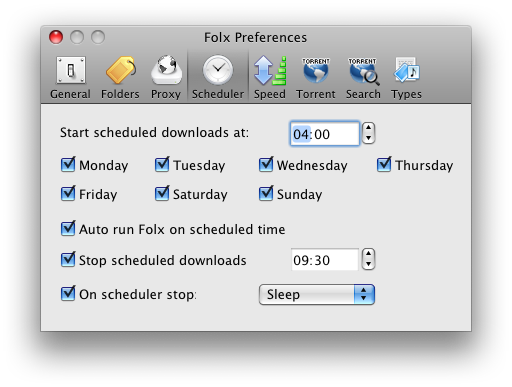
-
- Decide whether to start Folx automatically.
- Choose time to stop downloading.
- Choose whether to shut down, switch to sleeping mode or quit the program once downloads are completed (“On scheduler stop” item).
- Now, when all options are set, the download will start at the exact time you’ve specified.