In SWF Resource Panel you can view the inner structure of a SWF file (shapes, morphs, fonts, texts, sounds, videos, buttons, sprites, frames, scripts and binary data):
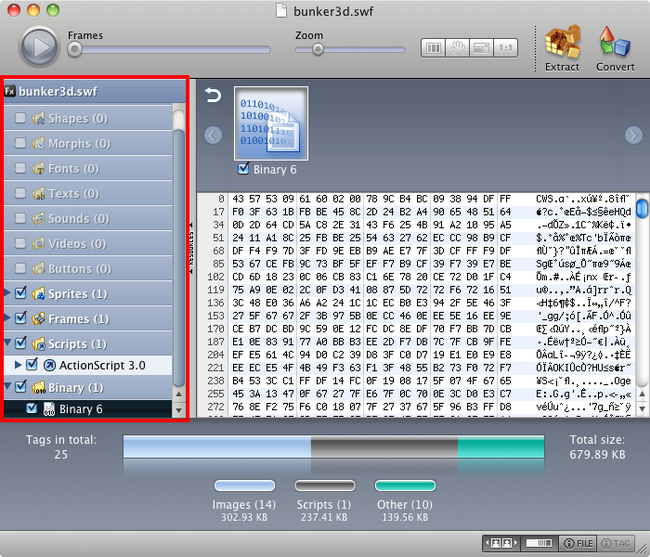
1. The file name is displayed on the top of SWF Resource Panel. You can see whether it is a Flash or Flex file – you will see either  or
or  icon.
icon.
2. Click the file name to load the file to Player.
3. Click  or
or  buttons to preview objects of a certain group.
4. If you click the item in SWF Resource Panel, you’ll see its thumbnail in Thumbnail bar (if it is shown). Moreover, the item chosen will be displayed in Player. You will also see Tag info of the selected file.
5. Moreover, here you can choose which group of objects or what resources to extract by ticking the corresponding checkboxes.
You can show/hide SWF Resource Panel by clicking “Resources” button on the right border of this panel, or go to Main menu –> View and click “Show resources” option.
You can customize main window workspace by dragging SWF Resource Panel, thus getting more space for Player.
In Tag chart you can see the info about tags of the file, currently displayed in Player:
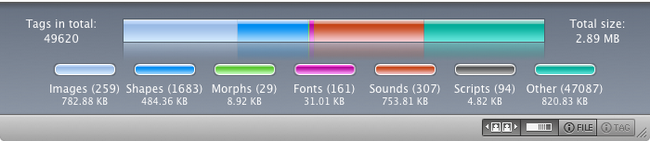
Tag chart provides info about the total number and size of file’s tags, as well as the number and size of tags for a certain resource, e.g. images.
You can show/hide Tag chart in Main menu –> View –> Show Tag chart, or just click  Status bar button.