Flash Decompiler Trillix comes in handy when you don’t need to re-do the whole SWF file, just some of its elements. Extraction function of Flash Decompiler lets you extract all the objects used in a SWF file into different file formats for further editing or using them in other applications.
You can easily export some separate elements of a Flash movie and save them to your hard drive. Images, sounds, texts, links, morphs, fonts, shapes, sprites, buttons and ActionScript can be exported in a variety of formats.
- First, please, add a file to "My tasks" list.
- After you’ve added the required file, which objects you want to extract, please, switch to "Extract" tab, which is located at ribbon bar.
- Select or write manually the destination folder ("Export path" field), where the resulting SWF objects will be stored. Use "Open destination folder after extraction" checkbox if you want Flash Decompiler to open a folder with the results immediately after the extraction process.
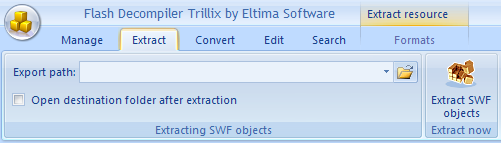
- Tick all the necessary objects to be extracted in "My tasks" list after previewing them in Main player window.
- Now, please, switch to "Formats" tab and choose the desired format for objects to be extracted.
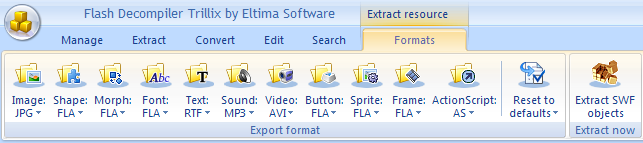
- Click "Extract SWF objects" button to start the extraction process.
Note: Since Flash Decompiler v.5.1, conversion options are applied to extraction of SWF objects into FLA. It is useful when you need to set some additional FLA options, like FLA format version. Conversion options are described in the Ribbon bar (Convert tab) section of this User Guide.