When a new connection is created, you can edit it. Serial to Ethernet Connector allows you to do it on the go.
Please, choose the connection in Connections tree and click “Edit” toolbar button or just right-click the connection in Connections tree and select “Edit connection” from the context menu.Now you are able to change such settings as:
- Connection name.
- Serial port which participates in connection.
- Tick “Create as virtual serial port” option if you would like to use virtual serial ports instead of real ones. Tick “Strict baudrate emulation” checkbox if you want to enable baudrate emulation. You can find more details about our virtual serial port and baudrate emulation technologies here.
- IP address (or network name) of the remote end and port number to connect to. Make sure that the port numbers are the same at both ends and are not blocked by firewall.
- You can also specify the port to receive the data, regardless of the port the data is sent to. It may be useful if you create UDP connection with several devices that have the same ports.
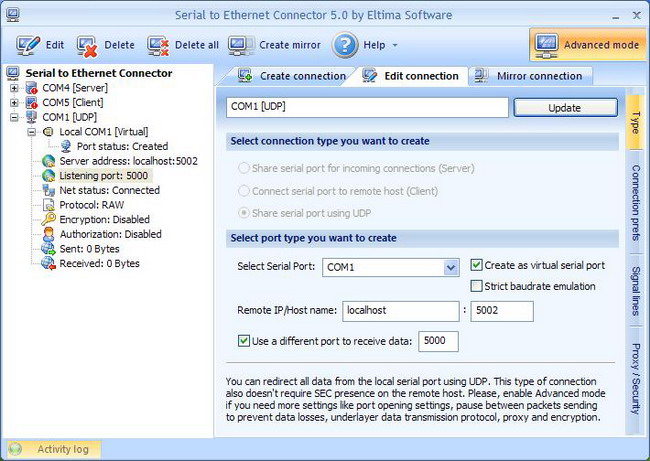
When you finish editing your connection, just click “Update” button and continue the communication process.