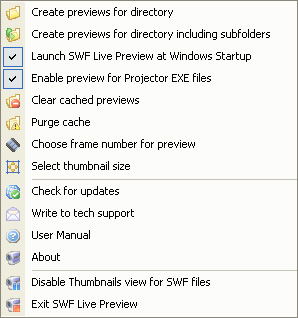
You can configure SWF Live Preview settings by right-clicking its icon in the system tray.

The following options can be configured:
- “Create previews for directory” – select folder to scan for Flash files (excluding subfolders)
- “Create previews for directory including subfolders” – select folder to scan for Flash files (subfolders will be scanned too)
- “Launch SWF Live Preview at Windows Startup” – automatically launch SWF Live Preview at Windows startup
- “Enable preview for Projector EXE files” – enable/disable preview for Projector EXE files
- “Clear cached previews” – remove cache previews completely
- “Purge cache” – synchronize cache by removing thumbnails of unused or deleted Flash files. This will free some storage space.
- “Choose frame number for preview” – you can choose which frame to use as thumbnail. This option may be useful if the first frames are black or have small shapes that are hard to notice.
- “Choose thumbnail size” – you can specify thumbnail size (from 32 to 255 pixels)
- “Check for updates” – check for SWF Live Preview updates
- “Write to tech support” – contact us using online form if you have any questions concerning SWF Live Preview
- “User Manual” – read the user manual
- “About” – view program version, license information, etc.
- “Disable Thumbnails view for SWF files” – disable SWF Live Preview
- “Exit SWF Live Preview” – close SWF Live Preview