Serial to Ethernet Connector - Managing signal lines in connections

Starting from version 4.1 we bring completely new great feature of managing signal lines for those who wants to configure port signal lines states in connections for its various states.

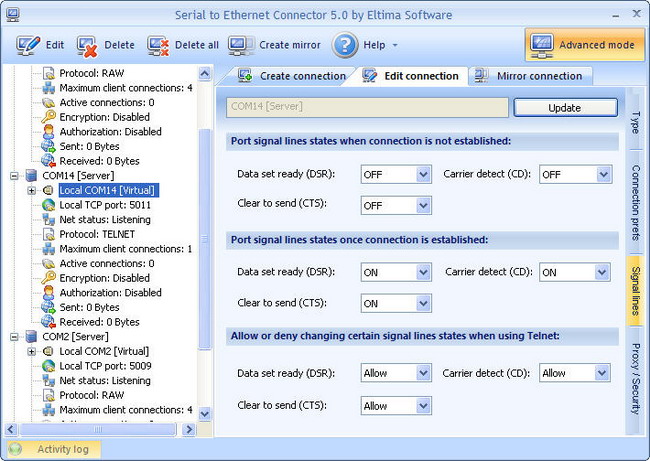
To make signal lines settings available, first of all, please, activate Advanced mode by enabling the corresponding button on the main toolbar. Then switch to "Signal lines" tab in the main window and you will be shown the following set of features:

1. When you are using virtual serial port in connection, you are able to modify the following:


Port signal lines states when connection is not established
Here you can change state of DSR, CTS and CD signal lines when connection has "Disconnected" status in "client" connection or there are no connected clients in case of "server" connection. 
Port signal lines states once connection is established:
You are able to manage the same signal lines (DSR, CTS, CD) states at the moment when connection is already established.
Allow or deny changing certain signal lines states when using Telnet protocol:
If you are using Telnet data transmission protocol in your connection you can allow or deny changing DSR, CTS and CD signals state.

2. If real (physical) serial port is used in connection, you will be able to configure the following signal lines settings: 


Port signal lines states when connection is not established:
You can change state of DTR and RTS signals when connection is not established yet, in other words, when connection has "Disconnected" status in "client" connection or there are no connected clients in case of "server" connection. 
Port signal lines states once connection is established:
You are able to manage the same signal lines (DTR, RTS) states at the moment when connection is already established.
Allow or deny changing certain signal lines states when using Telnet protocol:
Here, you can allow or deny changing DTR, RTS and CD signal lines states when you are using Telnet protocol in your connection.