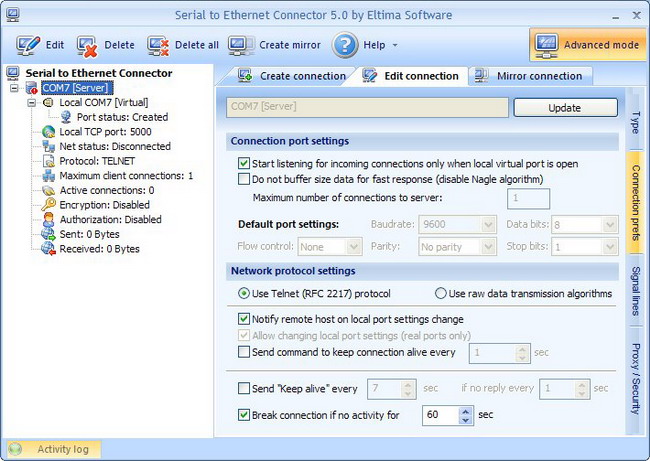
To configure advanced connection settings, please, activate Advanced mode by clicking the corresponding toolbar button. Now switch to “Connection prefs” tab, where you will see the following set of options:
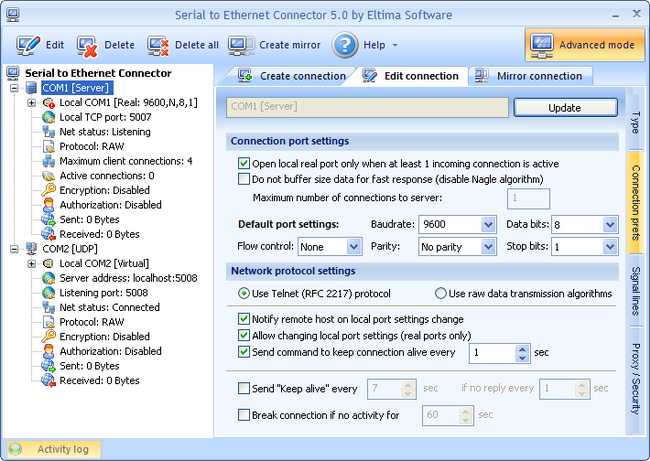
1. “Open local real port only when at least 1 incoming connection is active” option, if checked, permits to open a shared local real serial port provided that at least one connection comes from the client side. It helps to keep a serial port available for local usage if there are no incoming connections. This option is applicable only if a real port is used in connection.
2. “Do not buffer size data for fast response” checkbox is used for disabling “Nagle algorithm” to achieve maximum speed of response if small packets are transmitted over network. Note, that this will increase traffic. If you are not sure, please, do not modify this option.
3. “Maximum number of connections to server” option defines maximum number of clients that can be simultaneously connected to the server at a time. Use this option if you want to restrict the number of connections (for instance if you have limited bandwidth). For Telnet server this value is always “1”.
4. “Default port settings” option lets you manually assign predefined real port settings (for instance, if you have legacy serial port device that has specific parameters).
Real port settings can be also set automatically from the remote end, where virtual port is used for connection (if Telnet protocol is used).
This option is not available (grayed out) if you are creating virtual serial port since communication parameters are set by the application which opens the virtual port.
The following real port settings are available for configuration:
– Baudrate defines the rate at which bits are transmitted (bits per second). In the serial port context, “9600 baud” means that the serial port is capable of transferring a maximum of 9600 bits per second. To be able to communicate at the maximum speed, both local and remote ends must be configured to the same baud rate.
– Data bits option defines the number of data bits to be transmitted. Usually, the transferred bits include the start bit, the data bit, the parity bit (if used), and the stop bit. However, only the data bits carry useful information. You can configure Data bits to 5, 6, 7, or 8. Data is transmitted as a series of five, six, seven, or eight bits with the least significant bit sent first (little-endian). At least seven data bits are required to transmit ASCII characters. Eight bits are required to transmit binary data. Five and six bit data formats are used for specialized communication equipment.
– Parity defines the parity checking type. Parity can be one of the following: none, odd, even, mark, or space. If Parity is none, parity checking is not performed, and the parity bit is not transmitted. If Parity is odd, the number of mark bits (1s) in the data is counted, and the parity bit is asserted or unasserted to obtain an odd number of mark bits. If Parity is even, the number of mark bits in the data is counted, and the parity bit is asserted or unasserted to obtain an even number of mark bits. If Parity is mark, the parity bit is asserted. If Parity is space, the parity bit is unasserted.
– Stop bits option sets the number of bits used to indicate end of a byte. Stop bits can be 1, 1.5, or 2, however almost all contemporary devices are configured to 1 stop bit. Please, note that both ends of serial port must be configured to transmit the same number of stop bits to work properly.
– Flow control defines Flow control type. Flow control is used to ensure that the receiving serial port device can handle all of the incoming data sent to it. The following values can be assigned: Xon/Xoff (commonly used for asynchronous communication), Hardware and None.
5. “Network protocol settings” option lets you choose the underlay protocol to be used for data transmission in your connection:
5.1. Use Telnet (RFC 2217) protocol
There are four main functionality features of Telnet (RFC 2217) protocol:
– The ability for the client to change and send serial port configuration information to the server. This is needed to ensure that transmitted and received data is formatted correctly at the byte level.
– The ability for the server to inform the client of any modem or signal line changes.
– The ability to monitor and operate remotely any serial device.
– The ability to create port-to-port connection via TCP/IP protocol.
If you are using Telnet (RFC 2217) protocol to transmit data over network you can tune some additional options:
1. “Notify remote host on local port settings change” option permits to notify the other side that local port parameters were changed, thus enabling the other side to set the corresponding port parameters.
2. “Allow changing local port settings“ checkbox is available only when real serial ports are used in connection. If the remote host wants to change your local port settings, it will be allowed to change them.
3. “Send command to keep connection alive“ option enables you to specify period of time (in msec), after which Serial to Ethernet Connector sends a command to the remote end in order to verify connection’s integrity and keep the connection alive.
If Telnet is set as data transmission protocol in your connection, you can change real serial port settings on the remote host (provided virtual port is used on the other host). To achieve it the following boxes should be checked:
1. “Notify remote host on local port settings change” – on both hosts,
2. “Allow changing local port settings” – on the host, where real serial port is used.
In this case, if you change virtual serial port parameters, they will be automatically applied at the remote end, that is, real serial port settings will be accordingly changed.
Make sure you’ve decided what signal lines’ states are allowed to be changed when using Telnet protocol.
If both serial ports, used in connection, are real ones and “Notify remote host on local port settings change” and “Allow changing local port settings” boxes are checked, port parameters changes, which occur on one host, will be ignored by the other host.
5.2. Use raw data transmission algorithms
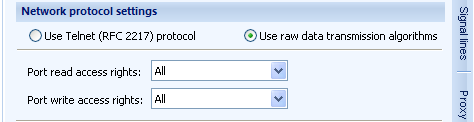
If “Use raw data transmission algorithms” option is used, you can specify the client’s read/write access rights to the local COM port:
6. Send “Keep alive” every X sec … if no reply every Y sec
Send “Keep alive” option gives an interlocutor “Keep alive” command if there is no data transfer between the sides during X seconds. An interlocutor must respond to this message.
It permits to find possible connection problems and to maintain active connection. Use this option if your device disconnects automatically after a definite time of net inactivity.
Y is an interval of sending “Keep alive” message in case an interlocutor didn’t respond to the last “Keep alive” command sent with X sec interval.
7. Break connection if no activity for (sec)
SEC will break connection if no network activity is observed during the specified period of time.